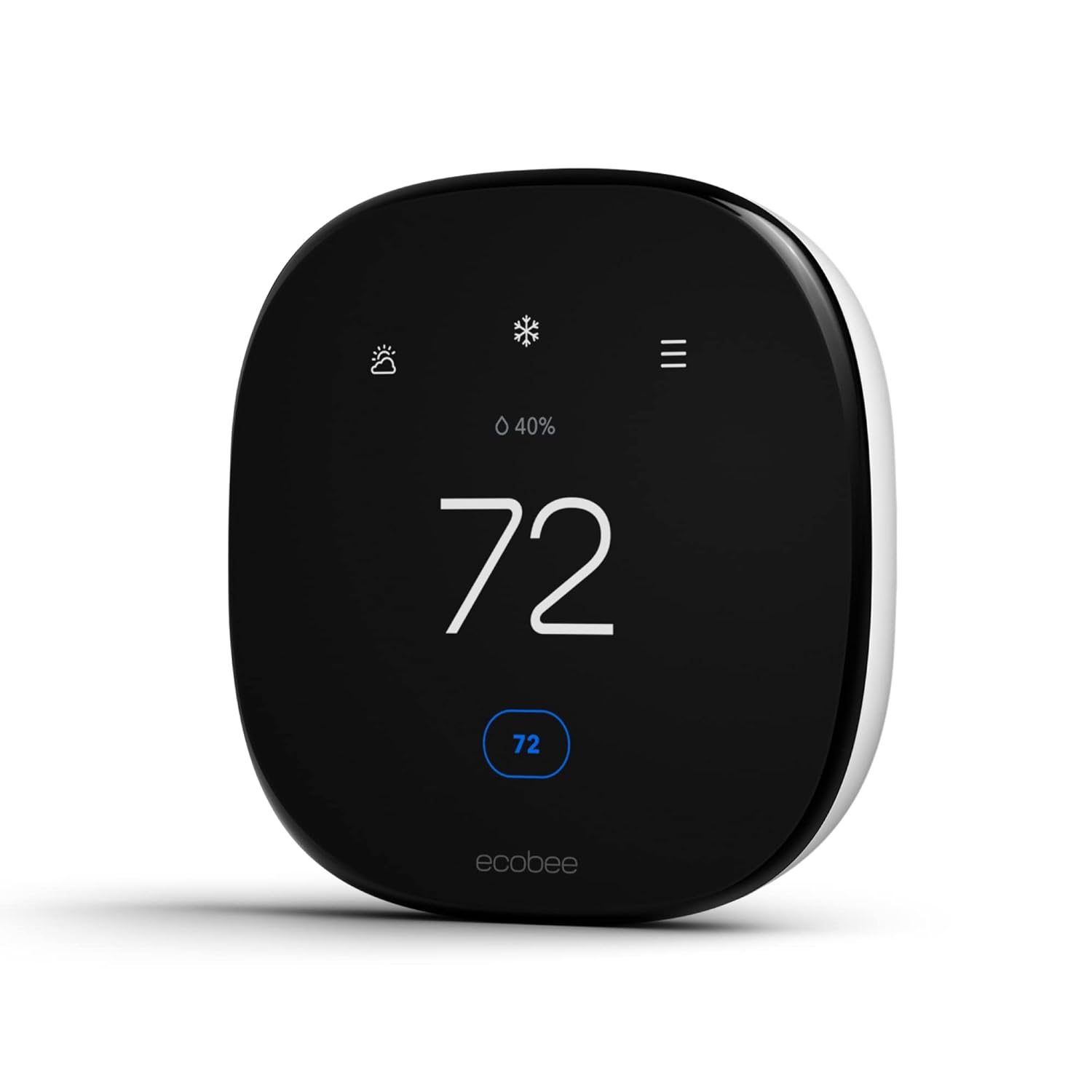
Save up to 26% per year on heating and cooling costs Automatically adjusts the temperature when you’re away to never heat or cool an empty home. Compared to a hold of 72°F
Preheats or precools your home before you arrive, so it’s the perfect temperature the moment you walk in. Automatically adjusts to your desired temperature when you’re home or sleeping to keep you comfortable day and night
Automatically adjusts the temperature to account for humidity so your home always feels like the temperature you’ve set
Easy to install and use every day, Power Extender Kit for homes without a C-Wire. Use your smart home platform and the Ecobee app to control your thermostat from anywhere with your smartphone, tablet, or Apple Watch
Hardwired so you never have to worry about losing control or replacing batteries
Add in a SmartSensor which allows you to measure the temperature in rooms that matter most.
Works with most 24 VAC HVAC equipment: Gas, oil, electric, dual fuel, forced air Conventional (2H/2C) Heat Pump (3H/2C), & Boilers. Includes Power Extender Kit for homes without a C or Common Wire, to ensure an easy installation
Compatible with 90% of systems
Specification: ecobee Smart Thermostat Enhanced – Programmable Wifi Thermostat – Works with Siri, Alexa, Google Assistant – Energy Star Certified – Smart Home
Brand
ecobee
Model Name
Smart Thermostat Enhanced
Product Dimensions
0.94"D x 4.09"W x 4.09"H
Controller Type
Amazon Alexa, Android, Apple HomeKit, Google Assistant, iOS
Special Feature
Wired Smart Thermostat
Color
Black
Specific Uses For Product
Furnace
Temperature Control Type
Heating
Connectivity Technology
Wi-Fi
Included Components
ecobee Smart Thermostat Enhanced, Backplate, Wire labels, Screws & drywall plays plugs, power extender kit (for sysytems without a c-wire), trim plate, and quick start guide
Power Source
Corded Electric
Voltage
24 Volts
Material
Metal
Shape
Rectangular
Display Type
LCD
Control Type
App Control
Control Method
App
Connectivity Protocol
Wi-Fi
Mounting Type
Wall Mount
Style
Thermostat
Backlight
Yes
Specification Met
Energy Star
Number of Batteries
1 Lithium Ion batteries required. (included)
UPC
627988005003
Manufacturer
ecobee
Item Weight
1.01 pounds
Department
Unisex-Adult
Item model number
EB-STATE6L-01
Batteries
1 Lithium Ion batteries required. (included)
Warranty Description
3 year manufacturer.
Batteries required
Yes
Import
Made in the USA
3251 reviews for ecobee Smart Thermostat Enhanced – Programmable Wifi Thermostat – Works with Siri, Alexa, Google Assistant – Energy Star Certified – Smart Home
4.4out of 5
★★★★★
★★★★★
9
★★★★★
1
★★★★★
0
★★★★★
0
★★★★★
2
Write a review
Show allMost HelpfulHighest RatingLowest Rating
★★★★★
KMan –
Just got through installing my new Ecobee smart thermostat – enhanced version. It’s not the easiest thing to get up and running, but if you watch a few YouTube videos and pay close attention to the wiring requirements prior to attempting it, you’ll have it set up in 30 minutes. This was important because while you’re installing it, the AC has to be shut off. Mine came with a trim ring included, which was important because my previous thermostat footprint was a lot bigger than this so it saved me having to patch up paint around the edges.Make sure you know whether or not you have an active C wire connected to your existing thermostat (normally a blue wire) AND “operable” – meaning it’s hooked up to a C post on your existing thermostat — because if you don’t, this could complicate installation requiring you to install a wireless adapter to your main AC unit (included with mine but not needed). I don’t use Apple or Google to control it. I just use my wireless router and an Ecobee iOS application on my iPad, which seems to work fine. You to set it up manually if you’d like without using your phone or tablet, which is what I did. The main menu on the unit itself is pretty intuitive. Granted, its day one right now so I’ll post more if I see any issues. It seems to be working great and I like the schedule capability that allows you to set home, away, and sleep modes to adjust the temperature differently and automatically which is light years ahead of my ancient Honeywell unit. There is also a motion detector on the unit which can determine if you’re home or not and reset the temperature automatically. I turned that function off because we come and go often during the day and don’t want my AC ramping up every 2 hours.
Helpful(0)Unhelpful(0)You have already voted this
★★★★★
Mohamed –
With out even thinking, this product must buy, i bought two for my HVAC system, very happy with it, very smart and can control from outside home easily.
Helpful(0)Unhelpful(0)You have already voted this
★★★★★
Emy Mor –
Excelente calidad
Helpful(0)Unhelpful(0)You have already voted this
★★★★★
Dan R. Wojciechowski –
My home was built with two programable thermostats from a major manufacturer. I have been unhappy with these thermostats since I moved in. The old thermostats were hard to read (impossible in the dark until a button was pressed), could not be controlled or monitored remotely, and the programming was terribly unintuitive. I have to say they did work at turning the heating and cooling on and off. I wanted replace them with something to fix the deficiencies. A pair of Ecobee Smart Thermostat Enhanced units hit every goal.
First: The Ecobees were a breeze to install. If you don’t know how, the app walks you through every step, even reminding you to take before and after pictures of the wiring. Second: The interface is night and day better than the old units. The touch screen works nicely. The menus are well designed. And if I don’t like using the unit touch screen, I can use the app on my phone or use the web site on my computer. Third: Remote control and monitoring is a breeze from either the phone or the web site. Fourth: The screen is large and bright and legible. The brightness can be tuned to the user’s preference. Fifth: The Ecobees come with efficiency options the programable units never had. They detect motion to determine occupancy. They can work with power companies to tune usage during peak hours. They can adjust temperature to account for humidity. Sixth: I can use my Alexas to control the thermostats by voice. Seventh: Based on external observation the thermostats and humidistats appear accurate.
As long as these units don’t die quickly, I am completely pleased with them.
Helpful(0)Unhelpful(0)You have already voted this
★★★★★
Jason –
This is not battery operated. If your house’s thermostat wiring doesn’t come with a C wire, consider paying for professional installation. The C wire is what supplies constant power to this thermostat, but some houses didn’t bother to run that wire because they assumed your thermostat will use batteries. This does NOT mean you’re out of luck, but it does make the install more complicated.
You will either need to run an additional wire through your walls or you’ll need to install the included PEK (not all thermostats of ecobee include it, so check your model and house wiring before buying). The PEK is, in my opinion, an ingenious piece of technology that deserves praise for how magical it seems. It repurposes 2 existing signal wires so that one wire becomes the C wire carrying constant power, and then the other wire carries various voltage levels to indicate multiple signals between thermostat and PEK; the PEK then translates those voltages and splits them back into separate wires for the rest of the system.
However, it does require work near or in your HVAC unit. I had to spend a good bit of time carefully inspecting the colored wires, making sure I knew exactly which is which. Again, houses are all different and some might use nonstandard wire colors; for example, my blue wire functioned as the Y wire, with no yellow in sight! You should be absolutely sure of what does what; you’ll probably want to read up on the purpose of each wire. ecobee includes stickers to help you label the wires as you investigate.
But once the PEK is installed, the thermostat works beautifully. The touch screen is responsive, it walks you through startup easily, and the app is full of features and settings galore.
Again, paying for a professional will save you wiring confusion whether you need the PEK installed or just run a new wire.
Helpful(0)Unhelpful(0)You have already voted this
★★★★★
Jad –
The seller delivered wrong model of this item after I waited 4 days for delivery. Ecobee is a good device but this seller can’t be trusted
Helpful(0)Unhelpful(0)You have already voted this
★★★★★
Denise Serrano –
El producto lo tuve que devolver porque no vienen las especificaciones pertinentes con la compatibilidad de ciertos equipos hvac. Antes de comprar preguntar con proveedor…
Helpful(0)Unhelpful(0)You have already voted this
★★★★★
Yusuf –
Highly recommend ecobee. Integrates seamlessly with iOS. The seller was great too – quick and efficient communication
Helpful(0)Unhelpful(0)You have already voted this
★★★★★
Tlingel59 –
I ordered this to take advantage of Amazon Prime Day. Delivery and packaging was great. Installation and setup was easy and straight-forward. But after about 15 hours of operation, the display was defective on the lower third. I called Ecobee and they suggested I contact the seller. Amazon said they don’t offer a replacement display/control module, but that I could return it as defective, so I did. Waiting to receive credit to my account. Anyway, Ecobee makes a great thermostat.
Helpful(0)Unhelpful(0)You have already voted this
★★★★★
Steve C. –
Upsides: Works with Apple Home (main reason I chose this one). Easy-to-read screen. Controls are fairly easy to understand. Inside temp/humidity. Can add satellite sensors (I have 4) to monitor various rooms in the house. Apple Home setup was easy.
Downsides: Was not that hard to install. The main issue was wiring instructions were not complete. I guessed the red went to R1 and not R1, and that yellow went to Y1, not Y2. Other colors were easy and only had one option. It came with a box with wires and did not explain what it was for. Looks like it would hook to the connector plates if the thermostat was not installed, but why? Does not seem to need it, whatever it is. Expensive. The upstairs and downstairs thermostats do not seem to talk to each other, but Apple Home and the Ecobee app can see both of them fine. Does not seem to share the sensors: They all only appear under the first thermostat I installed. I don’t like that I had to use the app to scan barcodes and configure it for Wi-Fi, etc. I should have been able to do all that from the screen.
The underlying assumption of the Ecobee is that I want to fully automate my home. I don’t. I want to be able to see and control the thermostats from Apple Home. The end. But you can’t see the sensors from there (probably not a thing implemented in the Matter protocol). I don’t want Siri involved. I don’t want to talk to it. I just want them to talk to each other and intelligently manage the HVAC, and to be able to remotely control them with Apple Home.
I do have to say that these are nice-looking units. Easy to read. Getting a weather report from the screen is nice.
The upstairs thermostat has the air quality sensor. It measures VOC and CO2. But it has been calibrating itself for days. Not sure I care that much. Glad I only bought one with that feature though.
It works. I like them. They integrate with Apple Home, so mission accomplished. All the other stuff is bells and whistles I don’t really care all that much about (although: Again: Better wiring instructions would have been nice)
Helpful(0)Unhelpful(0)You have already voted this
★★★★★
Sonya Good –
We have used a Nest in our home for many years, but with the changes in parent company and obsolescence of our first-generation device, it was time to change our smart thermostat.
The ecobee looks like a great alternative for a family used to a Nest. One of the main features that we liked was the built-in support for remote sensors. Like many houses, our thermostat is located in a hallway that is rarely traveled. The temperature tends to be cooler at the location, and there is not enough traffic for home-away mode to function effectively. Spreading out the sensors into multiple rooms was a must-have feature.
I would like to say that installation was a breeze, but it was not. The Nest worked a little differently, and our wires were labeled for how the Nest worked. Following how the wires were labeled meant that the Ecobee did not function correctly at first. Once I opened the HVAC unit and followed the wires back, they were color-coded correctly. Changing two wires and the Ecobee started working flawlessly.
The Ecobee is definitely larger than our old thermostat, but that is really not a problem. It has a bigger screen that is easier to read and use. The Ecobee connected to our eero 6 mesh wifi without any problems, and we configured it with the application. It immediately started providing outside temperatures and configuration for comfort. It was also picked up in our Apple HomeKit without a problem.
The one area we continue to struggle with is the granularity of control with the Ecobee. With our old system, we were able to define a sophisticated schedule for temperatures. The Ecobee just gives you Sleep, Home, and Away options with predefined temperatures. The temperatures are set in the comfort settings. This is also adjusted slightly by the eco+ settings. We were used to much more control with the old system. However, the important part is that we are comfortable. The hot spots in the home have been nearly eliminated by the sensors. It is different and takes getting used to.
The ecobee was less expensive considering the features you get.
Helpful(0)Unhelpful(0)You have already voted this
★★★★★
Vimarhonor –
I was extremely impressed by the ecobee smart thermostat enhanced. The device is attractive and easy to use. It integrated quickly with my SmartThings and works flawlessly with the schedules. The installation process was extremely easy. The app walks you through step-by-step from removing your old thermostat to installing the new one. Set up was a breeze. I love the fact that it provides reports, hourly daily weekly or monthly on the usage of your HVAC system. Mine is a heat pump and it differentiates between regular heat and aux heat, which is good to know to help me be able to conserve my energy usage. I highly recommend this thermostat. The only downside is that there is no circulation settings for the fan. There is an option to set the fan to run a minimum of a certain number of minutes an hour, but that’s not the same as a circulate mode which runs it as needed. I hope in the future enhancement they add this to their thermostats.



 Hybzone










KMan –
Just got through installing my new Ecobee smart thermostat – enhanced version. It’s not the easiest thing to get up and running, but if you watch a few YouTube videos and pay close attention to the wiring requirements prior to attempting it, you’ll have it set up in 30 minutes. This was important because while you’re installing it, the AC has to be shut off. Mine came with a trim ring included, which was important because my previous thermostat footprint was a lot bigger than this so it saved me having to patch up paint around the edges.Make sure you know whether or not you have an active C wire connected to your existing thermostat (normally a blue wire) AND “operable” – meaning it’s hooked up to a C post on your existing thermostat — because if you don’t, this could complicate installation requiring you to install a wireless adapter to your main AC unit (included with mine but not needed). I don’t use Apple or Google to control it. I just use my wireless router and an Ecobee iOS application on my iPad, which seems to work fine. You to set it up manually if you’d like without using your phone or tablet, which is what I did. The main menu on the unit itself is pretty intuitive. Granted, its day one right now so I’ll post more if I see any issues. It seems to be working great and I like the schedule capability that allows you to set home, away, and sleep modes to adjust the temperature differently and automatically which is light years ahead of my ancient Honeywell unit. There is also a motion detector on the unit which can determine if you’re home or not and reset the temperature automatically. I turned that function off because we come and go often during the day and don’t want my AC ramping up every 2 hours.
Mohamed –
With out even thinking, this product must buy, i bought two for my HVAC system, very happy with it, very smart and can control from outside home easily.
Emy Mor –
Excelente calidad
Dan R. Wojciechowski –
My home was built with two programable thermostats from a major manufacturer. I have been unhappy with these thermostats since I moved in. The old thermostats were hard to read (impossible in the dark until a button was pressed), could not be controlled or monitored remotely, and the programming was terribly unintuitive. I have to say they did work at turning the heating and cooling on and off. I wanted replace them with something to fix the deficiencies. A pair of Ecobee Smart Thermostat Enhanced units hit every goal.
First: The Ecobees were a breeze to install. If you don’t know how, the app walks you through every step, even reminding you to take before and after pictures of the wiring.
Second: The interface is night and day better than the old units. The touch screen works nicely. The menus are well designed. And if I don’t like using the unit touch screen, I can use the app on my phone or use the web site on my computer.
Third: Remote control and monitoring is a breeze from either the phone or the web site.
Fourth: The screen is large and bright and legible. The brightness can be tuned to the user’s preference.
Fifth: The Ecobees come with efficiency options the programable units never had. They detect motion to determine occupancy. They can work with power companies to tune usage during peak hours. They can adjust temperature to account for humidity.
Sixth: I can use my Alexas to control the thermostats by voice.
Seventh: Based on external observation the thermostats and humidistats appear accurate.
As long as these units don’t die quickly, I am completely pleased with them.
Jason –
This is not battery operated. If your house’s thermostat wiring doesn’t come with a C wire, consider paying for professional installation. The C wire is what supplies constant power to this thermostat, but some houses didn’t bother to run that wire because they assumed your thermostat will use batteries. This does NOT mean you’re out of luck, but it does make the install more complicated.
You will either need to run an additional wire through your walls or you’ll need to install the included PEK (not all thermostats of ecobee include it, so check your model and house wiring before buying). The PEK is, in my opinion, an ingenious piece of technology that deserves praise for how magical it seems. It repurposes 2 existing signal wires so that one wire becomes the C wire carrying constant power, and then the other wire carries various voltage levels to indicate multiple signals between thermostat and PEK; the PEK then translates those voltages and splits them back into separate wires for the rest of the system.
However, it does require work near or in your HVAC unit. I had to spend a good bit of time carefully inspecting the colored wires, making sure I knew exactly which is which. Again, houses are all different and some might use nonstandard wire colors; for example, my blue wire functioned as the Y wire, with no yellow in sight! You should be absolutely sure of what does what; you’ll probably want to read up on the purpose of each wire. ecobee includes stickers to help you label the wires as you investigate.
But once the PEK is installed, the thermostat works beautifully. The touch screen is responsive, it walks you through startup easily, and the app is full of features and settings galore.
Again, paying for a professional will save you wiring confusion whether you need the PEK installed or just run a new wire.
Jad –
The seller delivered wrong model of this item after I waited 4 days for delivery.
Ecobee is a good device but this seller can’t be trusted
Denise Serrano –
El producto lo tuve que devolver porque no vienen las especificaciones pertinentes con la compatibilidad de ciertos equipos hvac. Antes de comprar preguntar con proveedor…
Yusuf –
Highly recommend ecobee. Integrates seamlessly with iOS. The seller was great too – quick and efficient communication
Tlingel59 –
I ordered this to take advantage of Amazon Prime Day. Delivery and packaging was great. Installation and setup was easy and straight-forward. But after about 15 hours of operation, the display was defective on the lower third. I called Ecobee and they suggested I contact the seller. Amazon said they don’t offer a replacement display/control module, but that I could return it as defective, so I did. Waiting to receive credit to my account. Anyway, Ecobee makes a great thermostat.
Steve C. –
Upsides: Works with Apple Home (main reason I chose this one). Easy-to-read screen. Controls are fairly easy to understand. Inside temp/humidity. Can add satellite sensors (I have 4) to monitor various rooms in the house. Apple Home setup was easy.
Downsides: Was not that hard to install. The main issue was wiring instructions were not complete. I guessed the red went to R1 and not R1, and that yellow went to Y1, not Y2. Other colors were easy and only had one option. It came with a box with wires and did not explain what it was for. Looks like it would hook to the connector plates if the thermostat was not installed, but why? Does not seem to need it, whatever it is. Expensive. The upstairs and downstairs thermostats do not seem to talk to each other, but Apple Home and the Ecobee app can see both of them fine. Does not seem to share the sensors: They all only appear under the first thermostat I installed. I don’t like that I had to use the app to scan barcodes and configure it for Wi-Fi, etc. I should have been able to do all that from the screen.
The underlying assumption of the Ecobee is that I want to fully automate my home. I don’t. I want to be able to see and control the thermostats from Apple Home. The end. But you can’t see the sensors from there (probably not a thing implemented in the Matter protocol). I don’t want Siri involved. I don’t want to talk to it. I just want them to talk to each other and intelligently manage the HVAC, and to be able to remotely control them with Apple Home.
I do have to say that these are nice-looking units. Easy to read. Getting a weather report from the screen is nice.
The upstairs thermostat has the air quality sensor. It measures VOC and CO2. But it has been calibrating itself for days. Not sure I care that much. Glad I only bought one with that feature though.
It works. I like them. They integrate with Apple Home, so mission accomplished. All the other stuff is bells and whistles I don’t really care all that much about (although: Again: Better wiring instructions would have been nice)
Sonya Good –
We have used a Nest in our home for many years, but with the changes in parent company and obsolescence of our first-generation device, it was time to change our smart thermostat.
The ecobee looks like a great alternative for a family used to a Nest. One of the main features that we liked was the built-in support for remote sensors. Like many houses, our thermostat is located in a hallway that is rarely traveled. The temperature tends to be cooler at the location, and there is not enough traffic for home-away mode to function effectively. Spreading out the sensors into multiple rooms was a must-have feature.
I would like to say that installation was a breeze, but it was not. The Nest worked a little differently, and our wires were labeled for how the Nest worked. Following how the wires were labeled meant that the Ecobee did not function correctly at first. Once I opened the HVAC unit and followed the wires back, they were color-coded correctly. Changing two wires and the Ecobee started working flawlessly.
The Ecobee is definitely larger than our old thermostat, but that is really not a problem. It has a bigger screen that is easier to read and use. The Ecobee connected to our eero 6 mesh wifi without any problems, and we configured it with the application. It immediately started providing outside temperatures and configuration for comfort. It was also picked up in our Apple HomeKit without a problem.
The one area we continue to struggle with is the granularity of control with the Ecobee. With our old system, we were able to define a sophisticated schedule for temperatures. The Ecobee just gives you Sleep, Home, and Away options with predefined temperatures. The temperatures are set in the comfort settings. This is also adjusted slightly by the eco+ settings. We were used to much more control with the old system. However, the important part is that we are comfortable. The hot spots in the home have been nearly eliminated by the sensors. It is different and takes getting used to.
The ecobee was less expensive considering the features you get.
Vimarhonor –
I was extremely impressed by the ecobee smart thermostat enhanced. The device is attractive and easy to use. It integrated quickly with my SmartThings and works flawlessly with the schedules. The installation process was extremely easy. The app walks you through step-by-step from removing your old thermostat to installing the new one. Set up was a breeze. I love the fact that it provides reports, hourly daily weekly or monthly on the usage of your HVAC system. Mine is a heat pump and it differentiates between regular heat and aux heat, which is good to know to help me be able to conserve my energy usage. I highly recommend this thermostat. The only downside is that there is no circulation settings for the fan. There is an option to set the fan to run a minimum of a certain number of minutes an hour, but that’s not the same as a circulate mode which runs it as needed. I hope in the future enhancement they add this to their thermostats.